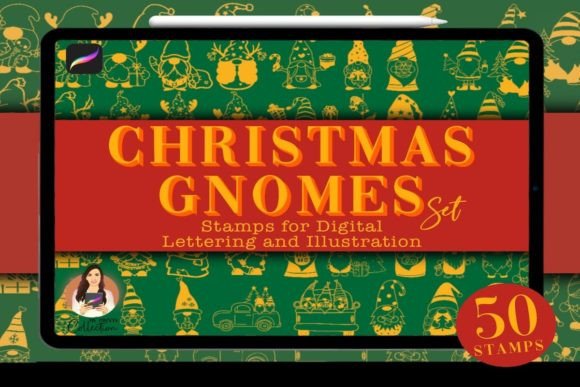
Integrating the 50 Christmas Gnome Procreate Stamp Set into Your Digital Holiday Workflow
The holiday season places unique demands on digital creators, marketers, and small business owners. Whether you are designing social media graphics, crafting digital invitations, or illustrating children’s books, the pressure to produce high-quality, festive content quickly is significant. This is where specialized assets become essential components of a streamlined creative process. The 50 Christmas Gnome Procreate Stamp Set serves as a practical solution for artists who need to maintain visual consistency while reducing manual drawing time. By incorporating pre-designed elements into your workflow, you can focus more on composition and storytelling rather than repetitive illustration tasks.
Understanding how to effectively deploy this asset requires looking beyond its aesthetic appeal. It is about integrating a specific toolset into a broader production pipeline. This guide explores how the Christmas Gnomes Procreate Set fits into various professional and personal projects, ensuring you maximize its utility from preparation to final export.
Preparation and Technical Compatibility
Before integrating any new asset into your workflow, technical verification is crucial. The 50 Christmas Gnome Procreate Stamp Set is delivered as a .brushset file, which is native to the Procreate ecosystem. It is important to note that this product is strictly compatible with the Procreate app, version 5 or higher. It is not compatible with Adobe Photoshop, Illustrator, or other raster-based software that does not support Procreate’s proprietary brush engine.
Your purchase includes a download of a zip file sized at 17.1 MB. This compact size ensures quick downloads even on slower connections, but it also means the assets are optimized for performance without sacrificing quality. Upon downloading, you will need to unzip the file on your device. For iPad users, this typically involves using the Files app to extract the contents before importing them into Procreate. Ensuring your software is updated to the latest version prevents import errors and guarantees that all stamp features, such as pressure sensitivity and rotation dynamics, function correctly.
Strategic Placement in the Creative Process
Digital assets like these gnomes can be utilized at various stages of a project, depending on your specific goals. Understanding when to introduce them can significantly impact your efficiency.
During the Drafting Phase
Many creators use stamps during the initial layout phase to establish visual balance. Instead of sketching complex characters from scratch, you can place gnome stamps to determine spacing and hierarchy within your composition. This allows you to experiment with different arrangements rapidly. If a gnome feels out of place, it can be moved, resized, or deleted instantly, facilitating a non-destructive workflow. This method is particularly useful for designers creating pattern repeats or border designs where consistent spacing is critical.
In the Final Illustration Stage
For illustrators, the set provides ready-made characters that can serve as focal points or supporting elements. Because these are stamps, they retain their crisp edges regardless of scaling, provided you do not exceed the original resolution limits excessively. You can layer these gnomes over textured backgrounds, adjust their opacity, or change their blend modes to integrate them seamlessly into your existing artwork. This approach saves hours of manual detailing, allowing you to allocate more time to lighting effects and color grading.
Workflow Integration and Efficiency
The primary value of the 50 Christmas Gnome Procreate Stamp Set lies in its ability to standardize output while accelerating production. For entrepreneurs and marketers managing multiple campaigns, consistency is key. Using a unified set of characters ensures that your brand’s holiday messaging looks cohesive across different platforms, from Instagram stories to email newsletters.
Consider a scenario where a small business owner needs to create ten different promotional graphics for a December sale. Drawing unique illustrations for each would be prohibitively time-consuming. By using the gnome stamps, the creator can maintain a consistent visual theme while varying the background colors, text overlays, and layout structures. This modular approach allows for rapid iteration and A/B testing of designs without starting from zero each time.
Furthermore, these stamps interact well with other Procreate features. You can duplicate layers, apply filters, or use clipping masks to add shadows and highlights specific to your scene’s light source. This level of customization ensures that the stamps do not look "pasted on" but rather feel like an integral part of the artwork.
Organization and Asset Management
As your library of digital assets grows, organization becomes vital. The Christmas Gnomes Procreate Set includes 50 distinct shapes, ranging from traditional Santa-inspired figures to whimsical "Merry Bright" variations. To maintain efficiency, consider organizing these stamps within Procreate’s brush library. You might create a dedicated folder for holiday assets, separating them from your everyday tools. This reduces search time during active projects and keeps your workspace clutter-free.
Additionally, since this is a digital product with no physical component, proper file backup is essential. Store the original zip file in a cloud service or external drive. This ensures that if you switch devices or reinstall Procreate, you can easily re-import the stamps without needing to repurchase or locate old emails. Treating digital assets with the same care as physical tools protects your long-term investment.
Quality Control and Customization
While stamps offer convenience, they should not limit creativity. High-quality integration involves adjusting the stamps to fit the specific context of your project. Pay attention to color harmony. The default colors of the gnomes may need adjustment to match your brand palette or the mood of your illustration. Use Procreate’s hue, saturation, and brightness controls to tweak the stamps subtly.
Resolution is another factor. Ensure that your canvas size is appropriate for your intended output. If you are designing for print, start with a high-resolution canvas (300 DPI) to ensure the stamps remain sharp. For web-only use, lower resolutions may suffice, but maintaining high quality future-proofs your work for potential repurposing.
Practical Use Cases Across Industries
- Educators: Create engaging holiday-themed worksheets or digital rewards for students. The cute aesthetic appeals to younger audiences while remaining professional enough for classroom use.
- Bloggers and Content Creators: Enhance blog headers and social media posts with festive flair. The stamps can frame text or add visual interest to otherwise plain layouts.
- Publishers: Use the gnomes as decorative elements in e-books or printable planners. They can serve as section dividers or chapter markers, adding charm without overwhelming the text.
- Freelance Designers: Offer faster turnaround times for client holiday cards by leveraging pre-made assets. This efficiency can improve profit margins and client satisfaction.
Long-Term Value and Reusability
Unlike trend-specific graphics that may become outdated quickly, classic themes like Christmas gnomes have enduring appeal. The 50 Christmas Gnome Procreate Stamp Set is an asset you can return to year after year. Over time, you may develop a signature style by consistently using these elements in your holiday collections. This repetition builds brand recognition and audience expectation.
Moreover, the skills you develop in integrating these stamps—such as layer management, color adjustment, and composition—are transferable to other assets. Mastering the workflow with this set prepares you to handle larger libraries of brushes and stamps in the future, enhancing your overall digital proficiency.
In conclusion, the Christmas Gnomes Procreate Set is more than just a collection of cute images; it is a productivity tool designed to streamline your creative process. By understanding its technical requirements, strategic placement, and customization potential, you can integrate it smoothly into your workflow. Whether you are a seasoned professional or a hobbyist looking to enhance your holiday projects, this set offers a balanced combination of convenience and creative flexibility. Focus on planning your implementation, maintaining organized files, and adapting the assets to your unique vision to achieve the best results.