Enhancing Digital Workflows with Abstract Brush Transparent PNG Assets
In the evolving landscape of digital design, efficiency and versatility are paramount. Designers, marketers, and content creators constantly seek tools that streamline their workflow without compromising aesthetic quality. One such resource that has gained significant traction is the Abstract Brush Transparent PNG collection. This asset pack is not merely a set of decorative elements; it is a functional toolkit designed to integrate seamlessly into various creative projects, from high-resolution print media to dynamic web interfaces.
Understanding the utility of these assets requires looking beyond their visual appeal. The core value lies in their adaptability. By combining traditional Photoshop brush formats with pre-rendered transparent PNGs, this product addresses two distinct user needs: the desire for customizable, hand-drawn effects and the need for quick, drag-and-drop implementation. For professionals managing tight deadlines, this dual-format approach offers a practical solution that balances creative control with operational speed.
The Composition and Technical Specifications
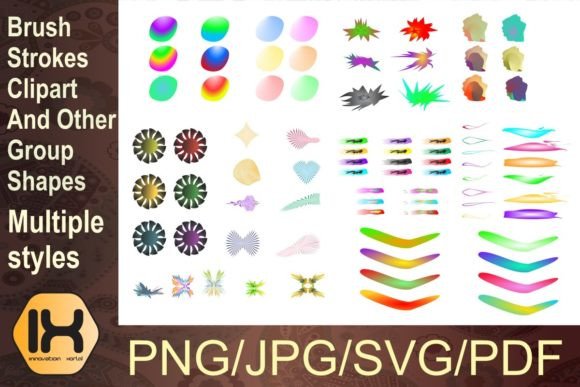
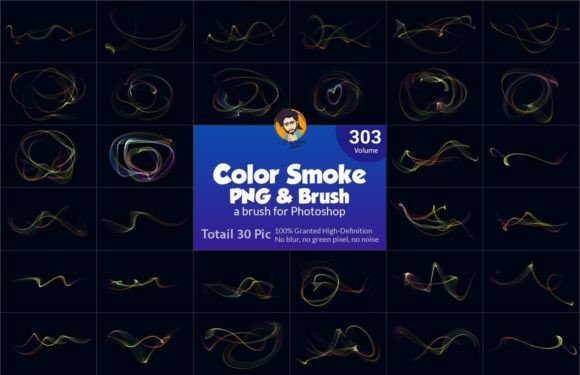
The foundation of any reliable design asset is its technical integrity. This particular collection comprises a total of 60 Photoshop brushes, strategically divided into 30 main shapes and 30 supporting spark decorations. This structure is intentional. The main shapes provide the primary visual weight and structure, while the supporting sparks add depth, texture, and movement. This separation allows designers to layer elements thoughtfully, creating complex compositions that feel organic rather than repetitive.
From a technical standpoint, the inclusion of Transparent PNG files alongside standard .abr brush files is a significant advantage. While Photoshop brushes offer infinite scalability and pressure sensitivity, they require specific software and a learning curve to master. Transparent PNGs, on the other hand, are universally compatible. They can be imported into video editing software, web design platforms, presentation tools, and mobile app interfaces without the need for specialized graphic design applications.
The resolution specifications further enhance their usability. Each element is rendered at a high definition of 3000 by 2000 pixels at 300 DPI. This high resolution ensures that the assets remain crisp and detailed whether they are used for large-format printing, such as movie posters and flyers, or scaled down for business cards and app icons. The 300 DPI standard is crucial for print production, preventing pixelation and ensuring professional-grade output.
Versatility Across Media Formats
The true strength of the Abstract Brush Transparent PNG lies in its cross-platform applicability. In today’s multi-channel marketing environment, a single visual concept often needs to be adapted for various mediums. These assets facilitate that adaptation effortlessly.
- Print Media: For flyers, posters, and business cards, the high-resolution PNGs provide immediate texture and visual interest. They can serve as background elements that do not overpower text, or as foreground accents that draw attention to key information.
- Digital Marketing: Social media graphics and web banners benefit from the lightweight nature of PNGs. The transparency allows for seamless integration over photographs or solid color backgrounds, maintaining brand consistency across different campaign visuals.
- Video and Motion Graphics: Video editors can import these PNG sequences or static images to create overlay effects. Whether used in movie posters, title sequences, or social media reels, the abstract forms add a layer of sophistication and motion blur simulation that enhances visual storytelling.
- Presentation Design: Educators and corporate presenters can use these elements to break up text-heavy slides. The alphabet design potential allows for custom typography treatments that make presentations more engaging and memorable.
This flexibility means that a single purchase can serve multiple departments within a small business or support a freelancer’s diverse client base. It eliminates the need to source separate assets for print and digital projects, thereby reducing costs and simplifying file management.
Usability and Workflow Integration
For users familiar with Adobe Photoshop, the .abr brush files offer a high degree of customization. The "free-hand custom" feature mentioned in the product description suggests that these brushes respond well to tablet input, allowing for natural variation in stroke width and opacity. This is essential for creating unique, non-repetitive designs. However, even for those who prefer a more structured approach, the pre-made PNGs offer an "easy to set" alternative. Users can simply drag, drop, resize, and adjust opacity to achieve the desired effect.
The organization of the pack into main shapes and supporting sparks aids in rapid prototyping. A designer can quickly establish a composition’s focal point using a main shape and then enhance it with sparks to create balance. This modular approach encourages experimentation and reduces the time spent searching for complementary elements.
Moreover, the transparency of the PNG files ensures that they blend naturally with existing design elements. There are no harsh white boxes or jagged edges, which is a common issue with lower-quality clip art. This cleanliness is vital for maintaining a professional appearance, particularly in corporate branding and high-end editorial design.
Target Audience and Practical Applications
Who benefits most from this type of asset? The answer spans a wide range of creative professionals.
Graphic Designers and Freelancers: For those handling multiple clients, having a versatile library of abstract elements can significantly reduce project turnaround times. Instead of creating textures from scratch, designers can focus on layout and typography, using these brushes to add unique flair.
Marketers and Small Business Owners: Individuals who manage their own marketing materials often lack advanced design skills. The transparent PNGs allow them to create polished-looking flyers, social media posts, and email headers using basic tools like Canva or PowerPoint, without needing to master Photoshop.
Educators and Presenters: Teachers and corporate trainers can use these abstract forms to create visually appealing educational materials. The ability to customize alphabet designs helps in creating engaging headings and section dividers in presentations.
Web and App Developers: While developers may not use Photoshop brushes directly, the transparent PNGs can be optimized for web use, providing unique background elements or UI accents that differentiate their digital products from generic templates.
Evaluating Long-Term Value and Limitations
When assessing the long-term value of the Abstract Brush Transparent PNG pack, it is important to consider both its strengths and its limitations. On the positive side, the high resolution and dual-format delivery ensure longevity. As display technologies improve and print standards evolve, 300 DPI assets will remain relevant. The abstract nature of the designs also contributes to their timelessness; unlike trendy illustrations that may date quickly, abstract forms tend to remain aesthetically pleasing over longer periods.
However, users should be aware of certain constraints. While the brushes are "easy to set," achieving a truly professional result still requires an eye for composition and color theory. Simply placing a brush on a canvas does not guarantee a good design. Additionally, while the PNGs are high resolution, they are raster-based. This means they cannot be scaled up infinitely like vector graphics without some loss of quality, although the 3000-pixel dimension provides ample room for most standard uses.
Another consideration is file management. With 60 high-resolution images and brush files, organizing the assets effectively is crucial. Users should establish a clear folder structure to locate specific shapes or sparks quickly during intense work sessions.
Final Thoughts on Creative Utility
The Abstract Brush Transparent PNG collection represents a pragmatic addition to any digital creator’s toolkit. It bridges the gap between high-end custom illustration and ready-made stock imagery. By offering both the flexibility of Photoshop brushes and the convenience of transparent PNGs, it caters to a broad spectrum of skill levels and project requirements.
For professionals seeking to enhance their workflow efficiency, or for entrepreneurs looking to elevate their brand visuals without hiring a dedicated design team, this asset pack offers a compelling value proposition. Its success in real-world applications depends on the user’s ability to integrate these elements thoughtfully into their broader design strategy. When used with intention, these abstract forms can transform mundane layouts into dynamic, engaging visual experiences. Ultimately, the worth of this product lies not just in the number of files included, but in the creative possibilities they unlock across print, web, and video media.