Mastering Texture: A Practical Guide to the Procreate Wood Cracked Bench Brush
Digital illustration has evolved far beyond flat colors and simple gradients. Today, audiences expect depth, tactile realism, and organic imperfections that mimic the physical world. Whether you are designing a logo for a rustic coffee shop, illustrating a fantasy scene with ancient ruins, or creating social media graphics for a sustainable brand, texture is the secret ingredient that bridges the gap between digital polish and authentic feel. This is where specialized tools like the Procreate Wood Cracked Bench Brush become indispensable assets in your creative toolkit.
However, simply downloading a new brush does not guarantee professional results. Many artists, from enthusiastic beginners to seasoned freelancers, fall into common traps when integrating texture brushes into their workflow. Understanding the nuances of this specific tool can save you hours of frustration and elevate the quality of your final output.
Understanding the Tool’s Specific Purpose
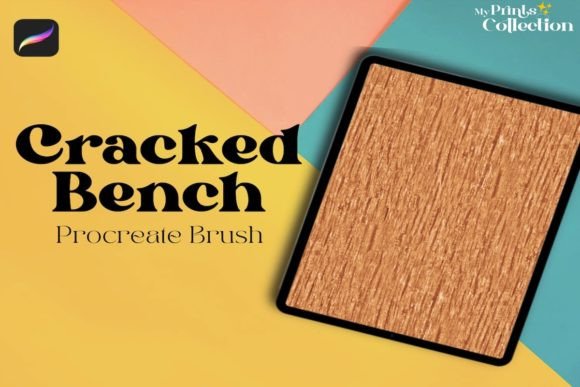
The Procreate Wood Cracked Bench Single Brush is designed with a very specific intent: to add a woody or wooden seamless pattern texture to your digital art. It is not a general-purpose sketching tool, nor is it a replacement for standard painting brushes. Its primary value lies in its ability to simulate the weathered, cracked appearance of aged wood benches or timber surfaces.
Many users mistakenly expect a single brush to handle every aspect of a wooden surface—grain, knots, varnish, and cracks. In reality, this brush focuses on the "cracked" and "bench" aesthetic, providing a foundational texture that suggests wear and history. Recognizing this limitation is actually a strength; it allows you to layer this effect precisely where needed without overwhelming your composition with unnecessary noise.
Common Compatibility Misunderstandings
One of the most frequent issues users encounter is not related to artistic skill, but to technical compatibility. Before you even attempt to use the brush, you must verify your software environment. The Procreate Wood Cracked Bench Brush requires Procreate App version 5 or higher.
A critical mistake many buyers make is assuming cross-platform compatibility. This is a digital product exclusively formatted for the Procreate ecosystem. It is not compatible with Photoshop, Illustrator, or other desktop-based design software. Attempting to import the .brushset file into Adobe products will result in errors or corrupted files. If your workflow relies heavily on desktop applications, you need to plan accordingly, perhaps by exporting your textured layers from Procreate before moving them to your main editing suite.
The Digital Delivery Reality
Because this is a digital product, no physical item will be sent to your address. Your completed purchase order includes a download of a zip file sized at approximately 1 MB. This small file size is efficient, but it can lead to oversight. Users often forget to unzip the file or struggle to locate it on their iPad.
To avoid confusion, ensure you have a file management app installed on your iPad, such as the native Files app. Once downloaded, tap the zip file to extract the contents. You should see the .brushset file clearly labeled. Tapping this file will automatically open Procreate and install the brush into your current brush library. If you skip the extraction step, Procreate will not recognize the format.
Avoiding the "Over-Texture" Trap
When artists first discover a high-quality texture brush like the Wood Cracked Bench, there is a tendency to overuse it. Applying the brush at full opacity across an entire canvas can make your artwork look muddy or chaotic. The cracks and grain patterns are detailed; if they compete with your main subject, the viewer’s eye loses focus.
Better Approach: Use the brush on a separate layer. This allows you to adjust the opacity and blending modes non-destructively. Try setting the layer mode to "Multiply" or "Overlay" to let the underlying colors show through while adding the wooden texture. Start with low opacity (around 20-30%) and build up gradually. This technique ensures the texture enhances the mood rather than dominating the image.
Ignoring Scale and Resolution
Another overlooked detail is the scale of the texture relative to your canvas size. A crack pattern that looks realistic on a small icon may appear pixelated or overly large on a high-resolution poster. The Procreate Wood Cracked Bench Single Brush is vector-based in its behavior, meaning it scales well, but the visual impact changes dramatically with size.
Always test the brush on a small section of your canvas before committing to the whole piece. Adjust the brush size using the slider to match the perspective of your object. If you are illustrating a close-up of a bench, larger, more defined cracks work best. For distant background elements, reduce the brush size and lower the opacity to suggest texture without detailing every fissure.
Maximizing Value for Professionals and Hobbyists
For entrepreneurs and small business owners, time is money. Using pre-made textures like this brush can significantly speed up your workflow compared to painting wood grain manually. However, efficiency only comes with practice. Spend ten minutes experimenting with the brush settings—pressure sensitivity, tilt, and streamlining—to understand how it responds to your Apple Pencil.
Educators and bloggers can use this tool to create engaging visual aids that stand out from generic stock photos. By adding a unique wooden texture to backgrounds or frames, you create a cohesive brand aesthetic that feels handcrafted and personal. This subtle differentiation can enhance communication and make your content more memorable.
Final Checklist Before You Begin
To ensure a smooth experience with the Procreate Wood Cracked Bench Brush, review these points:
- Verify Software Version: Confirm your Procreate app is updated to version 5 or higher.
- Check Device Compatibility: Ensure you are using an iPad capable of running the latest Procreate updates.
- Understand File Format: Remember this is a
.brushsetfile for Procreate only, not for Photoshop or Illustrator. - Prepare Your Workspace: Have your Files app ready to unzip the 1 MB download package.
- Plan Your Layers: Decide where the texture will sit in your layer stack to maintain flexibility.
By approaching this tool with a clear understanding of its capabilities and limitations, you transform it from a simple download into a powerful asset. The Procreate Wood Cracked Bench Single Brush offers a shortcut to realism, but the artistry lies in how subtly and strategically you apply it. Avoid the common pitfalls of compatibility confusion and over-application, and you will find that adding authentic wooden textures to your digital art becomes both enjoyable and efficient.